PHP import Excel data to MySQL using PHPExcel
How do I import Excel data into MySQL database using PHP
In this exercise, you will learn how to import Excel data to the MySQL database using the PHPExcel library. PHPExcel is a library written in pure PHP and providing a set of classes that allow you to write to and read from different spreadsheet file formats.
The web applications may contain data in various formats or they may have to collect data from various sources. It is not necessary that all the gathered data are compatible to store on the server. The most large-scale websites use server-side code to dynamically display different data when needed. Database stores information more efficiently, it can handle volumes of information that would be unmanageable in a spreadsheet. Spreadsheets have record limitations, whereas the database does not. So, we need to store these data into a database for future use. Here, we are using the PHPExcel library to import a CSV file into a PHP database. You can easily implement this by following these steps.



 Php programming
These are the steps to import Excel data to MySQL using PHPExcel -
Install PHPExcel with Composer
First, we need to install the PHPExcel library to read excel data. You can either download this from Github or install it using Composer. If your system is not installed composer, then first download the latest composer version from its official website -
https://getcomposer.org/download/
You can check a successful installation using the following command on cmd -
Now, go to your project directory on the command prompt and run the following command to install the PHPExcel library.
E:\wamp\www\exceltomysql>composer require phpoffice/phpexcelAfter this, you have noticed that Composer has downloaded all libraries under the 'vendor' directory of your project root. Here is the file structure of this project -
Excel File
Suppose we have the following excel file containing school program participants data -
Database Script (db.php)
Here, we have written the database connection code, make sure to replace 'hostname', 'username', 'password' and 'database' with your database credentials and name.
<?php
	$hostname = "localhost";
	$db = "school";
	$password = "";
	$user = "root";
	$mysqli = new mysqli($hostname, $user, $password, $db);
?>
If we want to store or import excel data into the MySQL database, we need a database table. So, we have a MySQL database 'school' and in it we have to create an 'participants' table with the given columns.
CREATE TABLE IF NOT EXISTS `participants` (
  `Id` int(11) NOT NULL AUTO_INCREMENT,
  `rollno` int(11) NOT NULL,
  `name` varchar(100) NOT NULL,
  `age` int(11) NOT NULL,
  `program` varchar(100) NOT NULL,
  PRIMARY KEY (`Id`)
) ENGINE=MyISAM AUTO_INCREMENT=5 DEFAULT CHARSET=latin1;
Create Upload File Template
To create a file uploader, we have created a simple HTML file upload form 'index.php'. If a form contains any file type input field, then we have to add an attribute 'encrypt' with a value 'multipart/form-data'.
Parse Excel and Insert into Database (uploadexcel.php)
In this PHP code, we have validated the uploaded file type and then included the PHPExcel library files and database configuration file (db.php). At each logical code, we have validated the execution. It returns an error message on failure. Further, PHPExcel parses the excel file, reads the data and stores it in an array. We have looped over this array to insert data into the database and show the response to the web browser.
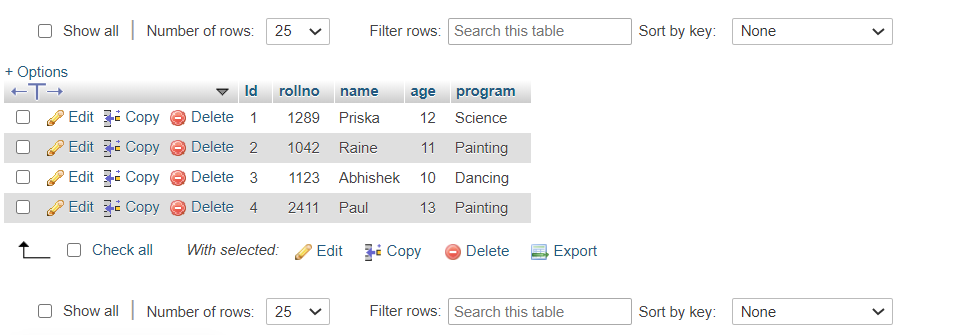
On successful execution, the data will be inserted in the database as in the given screenshot -
need an explanation for this answer? contact us directly to get an explanation for this answer