How to fetch data from database in PHP and display in PDF
In this exercise, you will learn how to fetch data from the database and display it in PDF using PHP FPDF library.
Today, document security is the most important concern for sharing information over the web. The PDF is the read only document that cannot be altered by users until they have the right electronic impression. By utilizing PDF, the associations can put username password on a PDF level to secure document information. There is also demand for producing PDF dynamically increased by the associations, like - generating an invoice, salary receipt, visiting card, etc. on a single click.



 Php programming
There are several PHP libraries available to generate PDF. In this exercise, we are using 'FPDF' to generate PDF. The F from FPDF stands for Free. This PHP library is used to generate PDF from UTF-8 encoded HTML. The FPDF contains high-level functions and is rich in features like image support, color support, page compression, automatic page break and link break. This library supports PHP version 5.1.
These are the steps to generate PDF to fetch data from database in PHP -
Download FPDF
Download the latest version of the FPDF library from its official website -
FPDF Library
Extract the zip file in your project directory.
Now, let's create a main PHP file 'index.php', that we will call in the browser. At the top of this page, include the FPDF library file.
require('fpdf/fpdf.php');Make a Database Connection
Make sure to provide the right fpdf.php path on your main PHP file. After this, write the database connection code and make sure to replace 'hostname', 'username', 'password' and 'database' with your database credentials and name.
// Database Connection
$conn = new mysqli('hostname', 'username', 'password', 'database');
//Check for connection error
if($conn->connect_error){
  die("Error in DB connection: ".$conn->connect_errno." : ".$conn->connect_error);
}
FPDF Class
Next, instantiate the fpdf class -
$pdf = new FPDF();The FPDF library has many pre-defined methods, we have used these methods among them.
AddPage() - To add a new page.
SetFont() - To set the font.
Cell() - To print a cell.
Ln() - Line break.
Complete Code: index.php
Here, we have merged all codes that were explained in detail above to generate PDF using the PHP FPDF library.
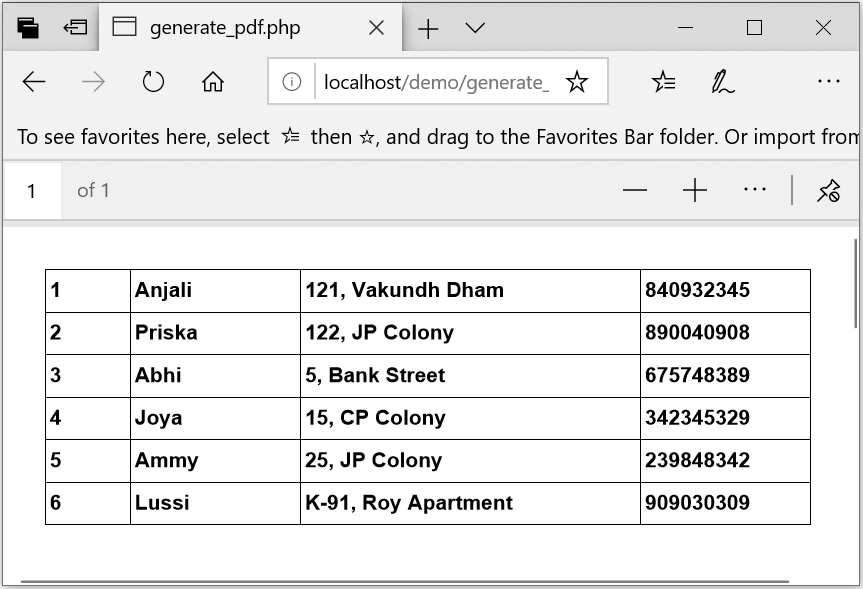
When, you will call this on the browser, it will look something like this -
need an explanation for this answer? contact us directly to get an explanation for this answer