This code will help you to understand how to show spinner/wait on an API call.
While making an API call, create and run an asynchronous task with the Run method to notify the wait using a spinner. The completion of the task can be notified using the CompletedTask property.
[index.razor]

@page "/"

<style>
    .loader {
        border: 5px solid #f3f3f3;
        border-radius: 50%;
        border-top: 5px solid #f58205;
        width: 30px;
        height: 30px;
        -webkit-animation: spin 2s linear infinite; /* Safari */
        animation: spin 2s linear infinite;
    }
    /* Safari */
    @@-webkit-keyframes spin {
        0% {
            -webkit-transform: rotate(0deg);
        }
        100% {
            -webkit-transform: rotate(360deg);
        }
    }
    @@keyframes spin {
        0% {
            transform: rotate(0deg);
        }
        100% {
            transform: rotate(360deg);
        }
    }
</style>

<h1>Counter</h1>

<p>
    Current count: <div class="@(spin ? "loader" : "")"> @(spin?"":currentCount.ToString()) </div>
</p>

<button class="btn btn-primary" @onclick="@IncrementCount"> Click me </button>
<button class="btn btn-dark" @onclick="@AsyncCallBack"> API Call Back </button>

@code {
    int currentCount = 0;
    bool spin = false;
    void IncrementCount()
    {
        currentCount++;
    }

    async Task AsyncCallBack()
    {
        spin = true;
        await Task.Run(() => APICallBack());  //<==check this!!!
        currentCount++;
        spin = false;
        await Task.CompletedTask;
    }

    void APICallBack() => Task.Delay(1500).Wait();
}
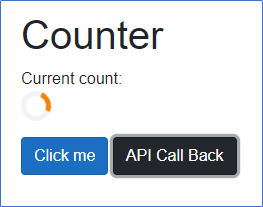
Output:
total answers (1)
start bookmarking useful questions and collections and save it into your own study-lists, login now to start creating your own collections.



 Asp.net
While making an API call, create and run an asynchronous task with the Run method to notify the wait using a spinner. The completion of the task can be notified using the CompletedTask property.
Output:
need an explanation for this answer? contact us directly to get an explanation for this answer